Cloud Computing Learning Tips for Beginners, From Zero to Job Ready
Three years ago, I sat in front of my laptop with mixed feelings. On one hand, I felt comfortable with my job as an on premise System Administrator. Physical servers, racks, UTP cables. Everything felt familiar.
In this article, we cover cloud learning for beginners in a practical way so you can apply it with confidence.
But on the other hand, I saw a trend I could not ignore. Job listings started mentioning “AWS”, “Azure”, “GCP” as requirements. Clients started asking about migrating to the cloud. Younger colleagues were already fluent talking about Kubernetes and serverless.
“Am I already behind?” I thought.
Turns out, no. Learning cloud in your 30s is not impossible. In fact, experience in traditional infrastructure becomes a strong foundation. What you need is clear direction and consistency.
This article is the guide I wish existed when I started. Not academic theory, but practical tips from someone who has been through the process.
Why cloud has become essential
Before talking about how to learn, let us first understand why cloud computing is so dominant now.
The paradigm shift
Back in the day, building IT infrastructure meant buying physical servers, renting data center space, and hiring engineers for 24/7 maintenance. It took weeks to provision a single new server.
Now? I can spin up 10 servers on AWS in 5 minutes. Pay only for what I use. Scale up when traffic is high, scale down when it is quiet. No need to worry about hardware failure because that is the provider’s responsibility.
This is not just a technical change. This is a fundamental shift in how businesses operate.
What companies are looking for
Based on my observations from various job postings and interviews:
- Understanding of core concepts: VPC, EC2/VM, S3/Storage, IAM
- Hands on experience: Not just theory, but actually deploying real applications
- Infrastructure as Code: Terraform, CloudFormation, or Pulumi
- Containerization: Docker and Kubernetes are increasingly becoming standard
- Cost optimization mindset: Cloud can be expensive if not managed properly
Choosing a cloud provider to learn
The classic question: AWS, Azure, or GCP?
My recommendation: start with AWS
Not because AWS is technically the best. But because:
- Largest market share: Over 30% global market share. More job openings.
- Most complete documentation: AWS has very detailed documentation and a large community.
- Generous free tier: 12 months of free access for many basic services.
Once you understand the concepts in AWS, moving to Azure or GCP is relatively easy. The concepts are similar, only the names and interfaces differ.
Alternatives for limited budgets
If you are worried about costs, here are some options:
- AWS Free Tier: t2.micro instance free for 12 months
- Google Cloud Free Tier: $300 credit for the first 90 days
- Azure for Students: $100 credit without a credit card (if you have a .edu email)
- Oracle Cloud Free Tier: Some VMs free forever (not just 12 months)
Most importantly, always set a budget alert. Horror stories about thousand dollar bills from forgotten instances are real.
A realistic learning roadmap
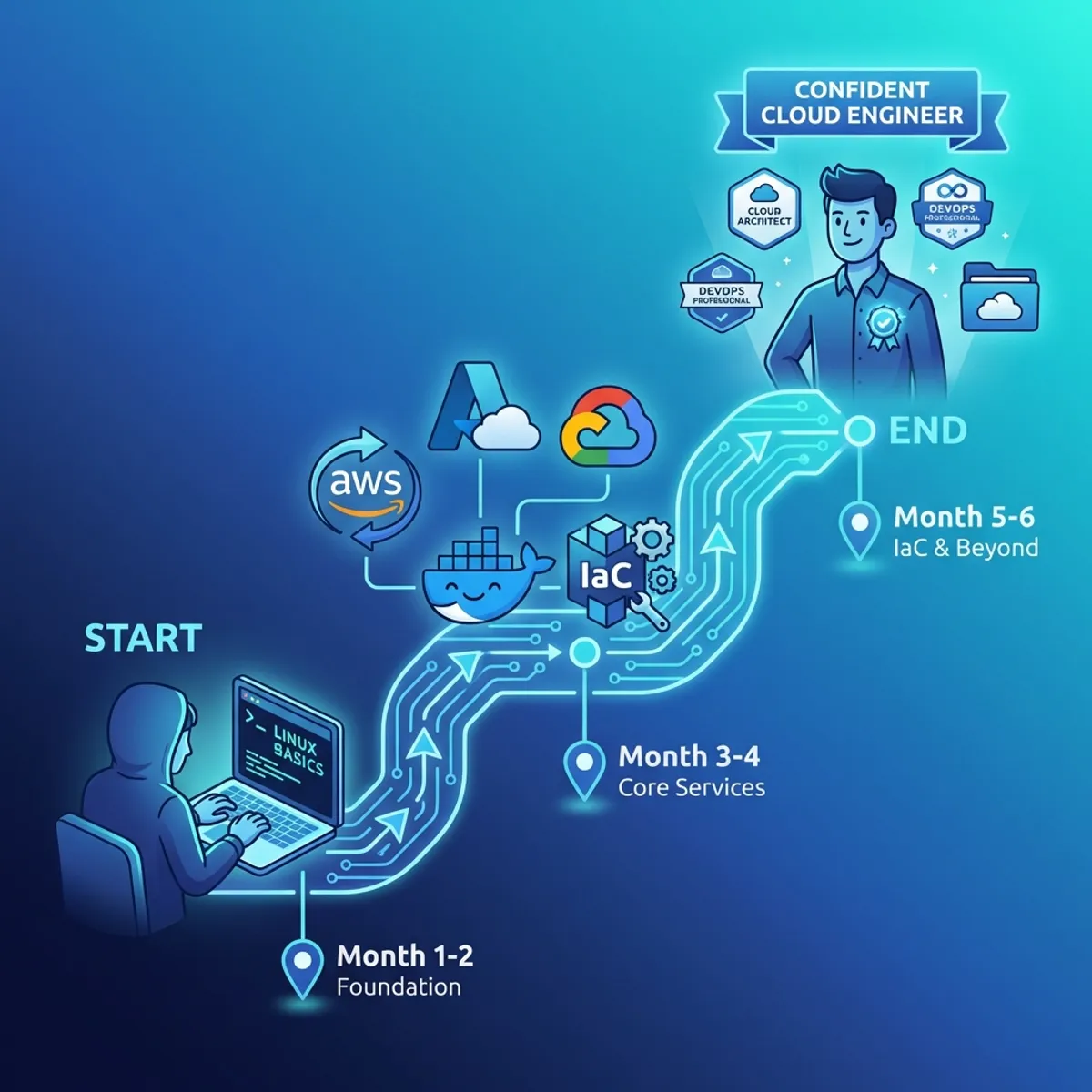
Here is the path I recommend for beginners.
Month 1 to 2: foundation
Goal: Understand basic cloud and infrastructure concepts.
Topics to master:
- What virtualization is and how cloud leverages it
- Basic networking (IP, subnet, DNS, firewall)
- Linux command line (very important)
- IAM concepts (Identity and Access Management)
Hands on:
- Create an AWS Free Tier account
- Launch your first EC2 instance
- SSH into the instance, install Nginx, access from browser
- Understand Security Groups and how to open ports
If you are not familiar with Linux yet, I suggest learning Linux basics for System Administrators first.
Month 3 to 4: core services
Goal: Master core AWS services.
Focus on:
- EC2: Instance types, AMI, EBS storage
- S3: Object storage, bucket policies, static website hosting
- VPC: Custom VPC, subnets, NAT gateway, routing
- RDS: Managed database, backup, read replicas
Hands on:
- Deploy a simple web application on EC2
- Setup an RDS database and connect it with the application
- Configure a VPC with public and private subnets
- Host a static website on S3
Month 5 to 6: automation and iac
Goal: Learn Infrastructure as Code.
This is what separates professional Cloud Engineers from those who can only click around in the console.
Focus on:
- Terraform: Most popular IaC tool, multi cloud
- CloudFormation: Native AWS, great for AWS only environments
- Ansible: For configuration management
Hands on:
- Recreate the infrastructure you built manually using Terraform
- Create reusable Terraform modules
- Setup a CI/CD pipeline for deploying infrastructure
For Terraform, I have written a complete Terraform guide from scratch that can be a reference.
Month 7 onwards: specialization
After the foundation is strong, pick one area to dive deep into:
- DevOps/SRE: CI/CD, Kubernetes, monitoring, observability
- Cloud Architecture: Design patterns, well architected framework
- Security: IAM deep dive, encryption, compliance
- Data Engineering: Data lakes, analytics services, ETL
Practical tips often overlooked
Do not just watch tutorials
YouTube is full of tutorials “Deploy X on AWS in 10 minutes”. Watching is good for an initial overview. But if you only watch without practicing, the knowledge will not stick.
What to do:
- Watch once for overview
- Practice on your own without looking at the video
- When stuck, then watch again
- Document the process and errors you encounter
Learn from errors, do not avoid them
Error messages are the best teachers. When an EC2 instance cannot be accessed, do not just delete and recreate it. Debug. Check the Security Group. Check the Route Table. Check the NACL.
This debugging process is what builds deep understanding.
Build a real portfolio
Certifications are nice, but a portfolio is better. Some project ideas:
- Static website with CI/CD: S3 + CloudFront + GitHub Actions
- Serverless API: Lambda + API Gateway + DynamoDB
- Three tier web app: Load Balancer + EC2 + RDS
- Kubernetes cluster: EKS with autoscaling
Document every project on GitHub with a clear README. This is what recruiters will look at.
Join communities
Learning alone is hard. Join communities to:
- Ask questions when stuck
- Get insights from more experienced people
- Motivation from fellow learners
Some active communities:
- r/aws and r/devops on Reddit
- Discord servers of various cloud communities
- Local meetups in your city
Do not get trapped in tutorial hell
This is a classic trap. Finish one course, immediately take another course. Feeling “not ready yet” to practice.
The reality is, you will never feel 100% ready. What makes the difference is the courage to start even when not perfect.
Finish one course, then practice immediately. Build something. Break it. Fix it. Repeat.
About certifications
A question that often comes up: are certifications important?
Honest answer: It depends on the situation.
When certifications help
- Career transition: From non IT to cloud, or from traditional IT to cloud
- Fresh graduates: As proof of commitment to learning
- HR filter: Some large companies use certifications as an initial filter
When certifications are less relevant
- Already have proven experience: Portfolio and track record speak louder
- Startup companies: Usually look more at practical abilities
Recommended AWS certification order
- AWS Cloud Practitioner: Entry level, general understanding
- AWS Solutions Architect Associate: Most sought after, design focused
- AWS Developer Associate or SysOps Associate: Depending on career direction
- Specialization: Security, Database, Network, etc.
Preparation for Solutions Architect Associate usually takes 2 to 3 months of consistent study.
Mindset to develop
Cloud changes fast
New services appear every month. Best practices change. What you learn today might be outdated in 2 years.
This is not a reason not to learn. This is a reason to build the ability to learn quickly (learning how to learn).
Cost is a feature
On premise, cost is a sunk cost. Already bought the server, done.
In cloud, every resource has a price tag. Cost optimization skills become very valuable. Companies will greatly appreciate engineers who can deliver results while keeping costs efficient.
Failure is normal
In cloud, everything can fail. Instances can die. Regions can go down. What makes the difference is how you design systems to keep running even when components fail.
This “design for failure” mindset is at the core of cloud architecture.
Closing thoughts
Learning cloud computing in 2026 is no longer a choice, but a necessity for anyone who wants a career in IT infrastructure. The good news is, resources for learning are more abundant than ever. Free tier is available. Documentation is complete. Communities are supportive.
What is needed is consistency and the courage to start.
Do not be afraid because you feel you are already late. Do not stop at tutorials without practicing. Do not wait until you feel “ready”.
Start now. Create a cloud provider account. Launch your first instance. Break it. Fix it. Repeat.
I have written about the journey of leaving the IT Support comfort zone that might be relatable if you are at a transition point.
A journey of a thousand miles begins with a single step. Your first step can begin today.
I hope this guide on cloud learning for beginners helps you make better decisions in real-world situations.
Implementation Checklist
- Replicate the steps in a controlled lab before production changes.
- Document configs, versions, and rollback steps.
- Set monitoring + alerts for the components you changed.
- Review access permissions and least-privilege policies.
Official References
Need a Hand?
If you want this implemented safely in production, I can help with assessment, execution, and hardening.
Contact Me
About the Author
Kamandanu Wijaya
IT Infrastructure & Network Administrator
Infrastructure & network administrator with 14+ years of enterprise experience, focused on stability, security, and automation.
Certifications: Google IT Support, Cisco Networking Academy, DevOps.
View ProfileNeed IT Solutions?
DoWithSudo team is ready to help setup servers, VPS, and your security systems.
Contact Us